Showing posts with label business documents. Show all posts

Monday, November 1, 2010

A business letter worth admiring

There are a few things in this letter I would correct: deeply-valued shouldn't have a hyphen; the men's names should have probably appeared in the same order throughout; and the family may be close, but there does need to be a space in "TheOrton." All in all, though, I thought the letter was wonderful. The message was warm and sincere, despite the sentimental content, and the picture of the company that emerged was solid.

I was especially happy to see that
  • the right case (objective) was used in "No matter whom you're shopping for this holiday season";
  • parallelism was preserved in "you'll find truly unusual gifts that evoke happy days, promote warm feelings, and bring a beaming smile to the face";
  • a hyphen was used in the adjectival compound "a family-owned business";
  • no comma separated adjectives in "special young person";
  • no comma appeared before the restrictive clause "when young ones raced downstairs"; and
  • that was used to denote the restrictive in "a family and a tradition that have endured."
The diction of the letter is also deserving of mention, I think: cherished; authentic; precepts of ardent, honest customer service; gratitude for…kindness, privileges, and opportunities. And note that three sentences toward the end begin with we:
  • We will celebrate being part of a family and a tradition that have endured through hard work, frugality, imagination, and ingenuity. [The last four nouns are nothing special by themselves, but together they are fresh and strong.]
  • We will celebrate the vast and growing audience of customers who today are part of that tradition, expanding it through their own deeply-valued stories and memories.
  • We are delighted to welcome you to this tradition and to our family.
When the reader finally gets to "Enjoy!" the exclamation point does seem fitting.

Thursday, October 28, 2010

Styles in Word 2007 for PC

I am just sharing a quick way to create a style in Word 2007. Below are some screen pics I took of when I did it on mine. Hope this helps the few of us that are using a PC and Word 2007. Images are below each step.


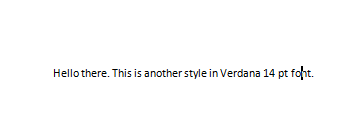
I just entered some text into Word.
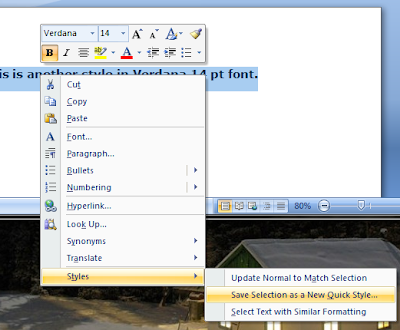
I selected by highlighting the text and the format box should appear. I chose the font from this format box as well as the size of the font and any other formatting characteristics that you would like (in this case, Bold-14pt.-Verdana font). Still highlighted, I right mouse clicked the highlighted region and moved my cursor to the "Style" option on this menu and then clicked the "Save Selection as a New Quick Style" option.


Once that is clicked, a box to name your quick style will appear. You only have to name the first box since the second box will rename itself once you hit the "OK" button.
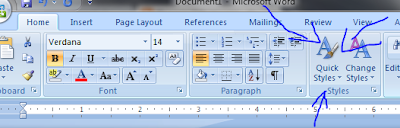
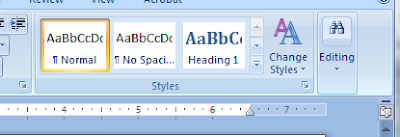
After that, you are done and can access your new "Quick Style" in your "Styles" menu under your "Home" bar (the two different pictures below are of an expanded menu and one that is minimized).
Minimized menu ^^

Expanded menu ^^

Hope this help.

Wednesday, October 27, 2010

Triage for business documents

Reading this section of our textbook (pp. 20–21), I was reminded of Samantha's and Tisha's analyses of the business letter distributed by the bathtub company. They saw all the letter's faults and problems, but they didn't give up on it, panic, or get out the editorial buzz saw. They determined the author's intention and tried to get the meaning of his letter to match it.

Think of yourself as a Red Cross worker who is taken to the scene of a natural disaster—the author's writing—and plunked down in the midst of disorganization and good but failed intentions. You have to rely on your instincts, what your supervisor tells you, and your training. An emotional reaction to such a situation is natural, so after you read the document and react to it, put it aside. Take it out later and reread it. The second time, you'll be able to evaluate it more objectively. Do this one or twice more, and you'll be able to separate your personal reaction from your professional goal: helping the author communicate with the reader.

You are really in the service of the English language and the printed word—not that of a poor writer. If you do your work well, both you and the writer will realize this and benefit from the experience.

Wednesday, September 15, 2010

Letter

I read through everyone's posts about the badly written letter we are to edit. I think the one thing that has been overlooked is that this is a solicitation letter or request. I worked for a firm that sent these out regularly after business had been completed. That being said, they are usually a template situation that are made to cut and past names into certain points of the letter. What this plumber is trying to do is get referrals. A complete rewrite is almost necessary to make it flow better.
As for the beginning, I think the "Aloha!" should be completely taken out. I do not think that is how a business letter should even start.

The Letter...

I am mortified that any company would send something like this out to its customers or the general public!!! I agree with Samantha in that I am having extreme difficulty simply copyediting, rather than tearing this piece apart and rewriting (something I had alluded to earlier when it came to editing papers). I'm truly frustrated because there are so many basic grammatical mistakes that it seems almost impossible to even distinguish a starting point!

Moving Large Sections of Text

I am looking at the business letter we were assigned to edit and having a difficult time drawing the line between editing and rewriting. I have been trying to make changes by moving and combining sentences and now I am wondering what is the cleanest way to indicate those changes. We have already seen a few examples of how to move phrases, etc. but how, for example, would I best indicate the following change:

Original-
Aloha! We just wanted to follow up with you on how are you and if everything is coming along satisfactory with your tub installation job, which we did for you on January 22 of this year.


Edited-
Aloha! We wanted to follow up on the tub installation job we did for you on January 22 of this year to ensure that everything is coming along satisfactorily.

Aside from some of the more minor edits, what is the cleanest way to move a large chunk of text without rewriting it?